
VS Code extension
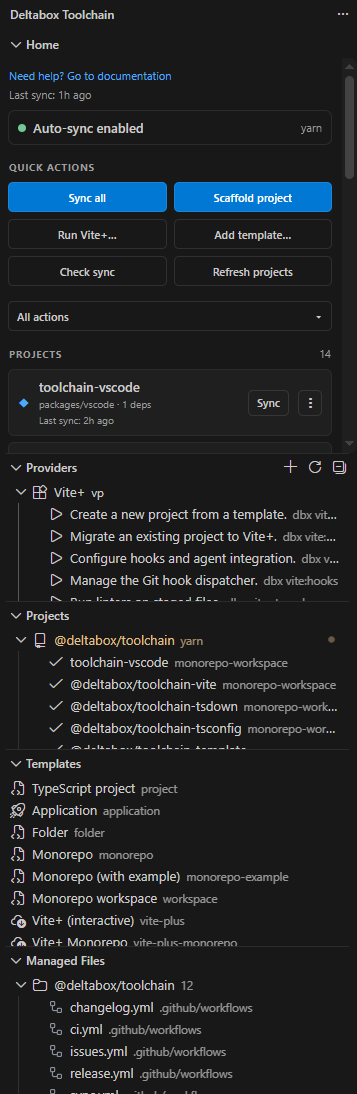
This VS Code extension provides a sidebar for managing projects.
Install
Download from the Visual Studio Code Marketplace.
or through the CLI:
code --install-extension deltabox.toolchain-vscodeCommands
| Command | What it does |
|---|---|
| Sync all / active / selected | Run dbx sync --recursive, which walks every managed project in dependency order (nested workspaces included). Configless projects are skipped unless deltabox.toolchain.manageConfigless is enabled. |
| Check sync | sync --check across the workspace. |
| Sync tsconfig | Run dbx sync --only tsconfig (refresh aliases/references after builds). |
| Format project | Run dbx fmt with the formatter detected/configured for the project (Oxfmt/Vite+, Prettier, Biome, dprint or standalone Oxc). |
| Lint project | Run dbx lint with the linter detected/configured for the project (Oxlint/Vite+, ESLint or Biome). |
| Manage tsconfig... | Auto-wire the root workspaces tsconfig paths/references (dbx tsconfig). |
| Scaffold project | Single project, monorepo root (with/without example), workspace, or From template.... |
| Generate configs / Generate config | Run project:config for missing configs (or for one project), or refresh only the project graph; picks TS/JS. |
| Migrate tooling... | Migrate Biome/Prettier/Dprint/ESLint/Oxc/vite config to the toolchain (dbx migrate). |
| Run workflow | Trigger generated workflows with their vendor CLI (gh/glab/az). |
| Run Vite+ command... | QuickPick over the Vite+ provider commands, run in a terminal. |
| Create Vite+ project... | vp create in a terminal. |
| Install MCP server + skill... | dbx mcp:install with a provider picker (Claude, Codex, VS Code, OpenCode, Pi or a custom directory). |
| Install official skill... | dbx skills --official with a provider picker; adds the official dbx docs skill only when missing. |
| List MCP installations | dbx mcp:list — show where the MCP server + skill are installed. |
| Generate changelog | Run dbx changelog in the selected project. |
| Clean build artifacts | Remove dist/ and *.tsbuildinfo (dbx cleanup). |
| Add provider... / Refresh providers | Register a custom provider (project or global registry) and reload the provider list. |
| Run command... | Run a provider command (dbx <command>) in a terminal (provider tree context menu). |
| Add template... / Remove template... | template:init --add / template:list --registry + template:remove. |
| Add template... / Remove template source... | Registry actions: add a template source or drop one while keeping the files; Refresh templates reloads the list. |
| Create from template... | dbx create --template <id> (terminal for online templates; --online is added automatically for online sources). |
| New registry... / Remove registry... / Refresh registries | Manage the provider/template registry search paths and reload the Registries view. |
| Choose dbx source... / Select dbx version... | Pick the project's dbx or the bundled CLI, and pin the toolchain version. |
| Refresh projects / Refresh files | Rediscover the project graph / reload the Managed Files view. |
| Show all actions | Open the searchable action palette (see Actions). |
| Reset tooling | Remove generated files / manifest / config. |
| Toggle auto-sync | Enable/disable sync-on-change. |
Interactive commands (the dev server, vp create, online scaffolding) run in an integrated terminal at the project root; everything else runs in the output channel.
Format project and Lint project are generic toolchain commands, not Vite+ commands: they run dbx fmt / dbx lint, which route to the detected/configured formatter and linter. A project using Prettier, ESLint, Biome, dprint or standalone Oxc gets the same actions as a Vite+ project (the vp passthrough is only used when Oxc is backed by vite-plus).
Tree context menus also expose scoped commands that are hidden from the Command Palette: Sync this project, Go to project, Run the project's Vite+ command, Remove provider, Copy provider id, Create from template, Show template info, Copy template id, and the registry item actions (Open registry, Add new registry, Remove registry).
Project menu
Every project card (and every project in the Projects tree) exposes the same actions, scoped to that project:
- Sync / Check sync — regenerate / verify the project's managed files.
- Generate config — write a
dbx.config.*(TS/JS), or refresh only the project graph. - Run workflow... — trigger one of the project's generated workflows. The picker lists every enabled workflow with its provider and path, and dispatches it through the matching vendor CLI (
gh,glaboraz). - Run Vite+ command... — run a
vpcommand in that project. - Reset tooling... — remove the generated files + manifest, or everything including the config.
- Go to project — reveal the project in the Explorer.
File Explorer decorations and project reveal
Every file recorded in a project's .dbx/toolchain/manifest.json gets a dbx badge and the contributed blue label color in the File Explorer. The decoration refreshes after a sync (and from Refresh files), and can be turned off with deltabox.toolchain.decorateManagedFiles. VS Code has no contribution point that overrides a single file's icon inside the active file icon theme, so the badge plus label color is the supported marker; changing the icon itself would require switching the whole workbench icon theme.
Switching the active editor selects the deepest project that owns the file in the Projects view and expands its workspace group. Files outside every project are ignored, the reveal never takes focus, and the listener is disposed with the extension.
Providers, templates and Vite+ in the editor
The Providers and Templates views read dbx providers --json and dbx template:list --json, so adding one surfaces it in the UI automatically.
Plugin mode
A project configured through the dbx() Vite plugin (rather than a dbx.config.*) is detected automatically: the Projects view shows it as plugin, sync stays enabled, and auto-sync watches vite.config.*. The extension never manages vite.config.* in plugin mode — the CLI's vite sync task skips it, and config generation skips projects that already have the plugin.
Vite+ commands are only enabled when Vite+ is detected for the project. When it is not, the provider and its commands are greyed out (available: false in dbx providers --json) and the extension refuses to run them, while plain Vite projects keep working normally.
Add provider...
Writes a custom provider to the default project registry (.dbx/toolchain/.registry/providers/providers.json) or the global ~/.dbx/toolchain/.registry/providers/ when you choose the global scope, which toolchainProviders() merges with the built-ins, so a registered provider's commands also become dbx commands (dbx <command>), runnable from the view.
Provider search paths can also be added with the Registries view; the deltabox.providerRegistrySearchPaths setting mirrors them globally.
Add template...
Runs template:init --add and asks whether to add the template to the global registry (yes by default), so it is available in every project.
See Global templates.
The deltabox.registrySearchPaths setting controls the global search paths and is kept in sync with the CLI config.
Remove template source...
Runs template:list --registry + template:remove.
The Registries view (below Templates) shows the detected provider and template registries as Providers / Templates roots.
Each item has Open registry (the folder in the explorer, or the website for remote URLs), Add new registry and Remove registry (it only drops the path, keeping the files).
The title bar's New registry... / Remove registry... actions add or remove search paths for either kind, asking whether they are global or project-scoped.
Remote registries are http(s) JSON registries: template registries accept { sources } or an array of sources; provider registries accept { providers } or an array of provider descriptors.
Create from template...
Prompts for the template's inputs and actions (see Templates) before running dbx create. Scaffolding also asks for a package manager (yarn default).
The Home view links to this documentation with Need help? Go to documentation.
Actions
The Actions view (below Projects) lists every dbx action grouped by area (Changelog, CI, Cleanup, MCP, Migrate, Pack, Project, Providers, Registries, Sync, Templates, Tools). Groups are collapsed by default and sorted ascending; expanding one shows its actions sorted by name. Selecting an action runs its VS Code command directly.
The Home view's More actions... button opens the same list as a searchable, paged QuickPick. Navigation entries (Go back, Next page (n/m)) are rendered before the real choices, and every prompt-based dbx flow (scaffolding, template pickers, ...) uses the same paging factory. Actions only delegate to their own VS Code command; the palette itself never shells out.
Auto-sync
The Home view shows the current state as a clickable Auto-sync enabled / Auto-sync paused button (the same secondary style as the other quick actions). Opening it lists the global and workspace scopes independently, so a global value and a workspace value can disagree:
- Enable/Disable (global) writes
deltabox.toolchain.enabledat the global VS Code scope and mirrors the value into the CLI global store (~/.dbx/toolchain/cli/config.json, viadbx enable/disable --global). - Enable/Disable (workspace) writes
.vscode/settings.jsonthrough the workspace configuration target (viadbx enable/disable --workspace).
A project's toolchain.enabled config takes precedence over both settings. The extension resolves it through the project's CLI (dbx enabled --json), so a disabled config keeps auto-sync off even when the VS Code setting is on.
Auto-sync watches input files only. The extension asks the CLI (dbx watch --list --json) for the concrete, project-graph-resolved files: every dbx.config.* plus each enabled project's tsconfig.baseFile, tsconfig.defaultFile and the root tsconfig.rootFile. Custom file names are honoured, nested configs can disable or override their own tsconfig section, and the list is refreshed whenever a dbx.config.* changes (and after each sync).
Each resolved pattern is scoped to its own workspace root (and a concrete nested file is watched from its own directory), so a same-named file in another workspace folder or an ancestor can never trigger this root's sync, and VS Code does not install a recursive watcher over the whole root (which can hold node_modules handles during a package-manager link step on Windows). Only the root whose input changed is synced. Setting deltabox.toolchain.watch explicitly replaces the resolved inputs; user globs are matched across every workspace folder, absolute/ancestor globs are ignored, and an empty list disables watching.
Generated outputs are never watched. The scheduler debounces bursts, allows one sync at a time, queues at most one follow-up, and suppresses events briefly after a run.
When a sync finds no workspace tsconfig files while tsconfig.refs/tsconfig.composite are on (or a tsconfig.workspaces.json is present), the extension surfaces the CLI's warning as a notification (once per session) with a Show output action.
When removing a section stops managing a file that dbx created, the sync notification lists the removed relative paths and offers Restore (write the previous content back) or Close. A file that existed before dbx first managed it is adopted: it is unmanaged but never deleted.
The Managed Files view also shows a Workflow conflicts group for hand-written workflows dbx left untouched (the manifest's workflowConflicts). Each item names the config key to opt out with, and opens the existing file.
Settings
| Setting | Default | Description |
|---|---|---|
deltabox.toolchain.enabled | true | Auto sync on watched changes. A project's toolchain.enabled config takes precedence. |
deltabox.toolchain.debounce | 300 | Debounce (ms) before a sync. |
deltabox.toolchain.command | sync | The command to run on change. |
deltabox.toolchain.manageConfigless | false | Manage projects without their own dbx.config.* (passes --configless to sync/watch). |
deltabox.toolchain.containerizeTemplates | false | Generate Docker artifacts when scaffolding a new project (also prompted per create). |
deltabox.toolchain.formatManagedFiles | true | Format the managed files written by dbx sync (adds --no-format when disabled). |
deltabox.toolchain.formatManagedFilesFix | true | Rewrite managed files when formatting instead of check mode (adds --no-format-fix when disabled). |
deltabox.toolchain.formatManagedFilesCommand | "" | Override the managed-file formatter command ({files} expands to the files). Empty = auto-detect. |
deltabox.toolchain.formatManagedFilesExclude | [] | Managed files to leave unformatted (globs; passed to dbx sync --format-exclude). |
deltabox.toolchain.enableFormatImportGroupDefaults | true | Add the resolved workspace sortImports custom group when syncing; set false to manage groups yourself. |
deltabox.toolchain.decorateManagedFiles | true | Show a dbx badge and blue label color on files recorded in the project manifests. |
deltabox.toolchain.watch | [] (resolved) | Inputs that trigger a sync (empty = resolved from the config). |
deltabox.toolchain.version | "" (auto) | Pin the @deltabox/toolchain version this workspace runs. |
deltabox.registrySearchPaths | [] | Template registry search paths (dirs or http(s) URLs). |
deltabox.providerRegistrySearchPaths | [] | Provider registry search paths (JSON files/dirs/URLs). |
deltabox.toolchain.enableFormatImportGroupDefaults (default true) adds the resolved workspace group to Oxfmt's sortImports.customGroups when the extension syncs or generates configs. Set it to false in user or workspace settings to keep full control of the import groups. The extension passes the effective value to the CLI; direct CLI runs and Vite+ configs also honour the workspace-scoped .vscode/settings.json value.
When a workspace has its own @deltabox/toolchain whose version differs from the extension's bundled CLI, the extension asks which to run and shows both detected versions. Select dbx version... pins a version in the project's .vscode/settings.json (like TypeScript's version picker); it runs that version via npx unless the project already installs it.
Project lookup follows the repository boundary: from the open folder (and every workspace root in a multi-root workspace) the extension walks up to the nearest .git, so a toolchain hoisted to the monorepo root is found even when a nested workspace package is opened as the folder. The project's own dbx stays the default; the bundled CLI is only the fallback.
Command palette
Search for deltabox: to find:
- Sync active project / Sync selected projects / Sync all projects
- Check sync
- Sync tsconfig
- Manage tsconfig...
- Scaffold project...
- Generate configs... / Generate config...
- Migrate tooling...
- Run workflow...
- Run Vite+ command...
- Create Vite+ project...
- Install MCP server + skill...
- Install official skill...
- List MCP installations
- Generate changelog
- Clean build artifacts
- Add provider... / Refresh providers
- Add template... / Remove template...
- Add template... / Remove template source... / Refresh templates
- New registry... / Remove registry... / Refresh registries
- Choose dbx source... / Select dbx version...
- Refresh projects / Refresh files
- Show all actions
- Reset tooling...
- Toggle auto-sync
The project and tree context menus add scoped commands that are intentionally hidden from the palette (sync this project, go to project, run the project's Vite+ command, remove/copy a provider, template info/copy id, and the registry item actions).